
Are your negatives safe? A practical guide for 2026
Contents
- Assessing negatives safely: what to look for
- Recognising vinegar syndrome and what to do
- Scanning at home or using a professional: which is safer?
- Sending negatives safely by post
- How to store negatives after scanning
- Cost and quality: what should you expect?
- Conclusion
- Frequently asked questions
Last updated: 11 September 2026
Assessing negatives safely: what to look for
Assess the condition of negatives by checking four things together: smell, shape, colour and surface. A negative without an unusual vinegar smell, serious distortion or a powdery deposit will generally be easier to scan safely. These checks are useful indicators, not a guarantee of condition.
Never touch the image area with bare fingers. Skin particles and oils can damage older photographic negatives.
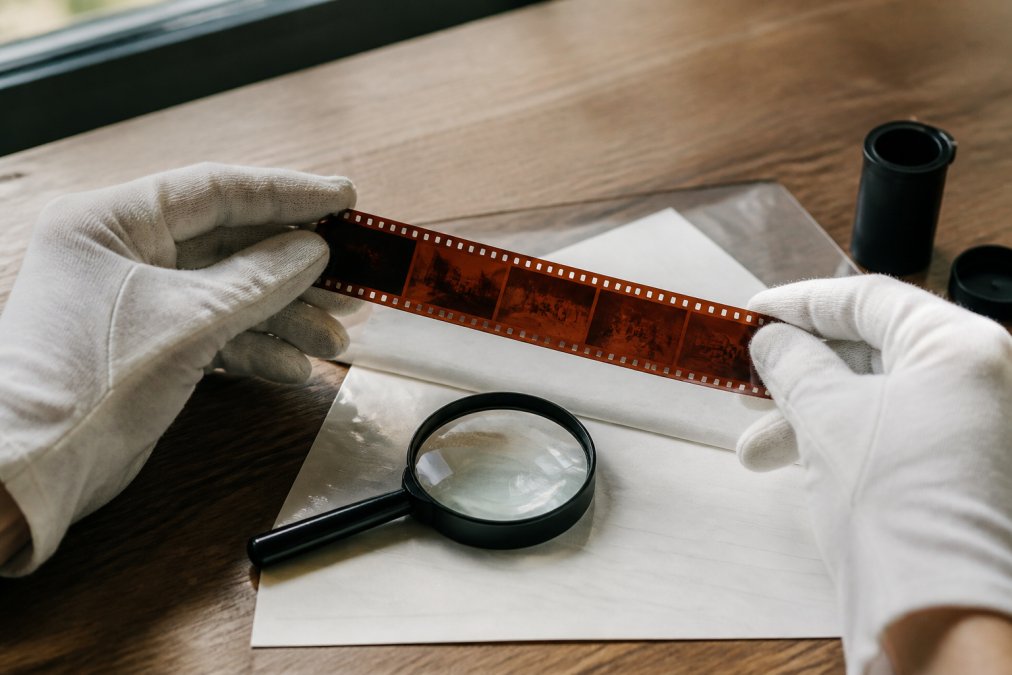
A physical inspection in five steps
Use a consistent inspection routine before putting a strip near a scanner. You do not need expensive equipment: a clean table, an 8× to 10× magnifier, a hand blower, clean gloves and a torch or window light will help.
- Open the sleeve carefully. Remove the strip only if it slides out freely, and support it on a clean, dry surface without rubbing the image area. Notice any unusual odour when opening the sleeve; do not deliberately inhale fumes.
- Notice unusual odours. Sound negatives usually have little noticeable smell. A sharp vinegar-like odour can indicate chemical breakdown of an acetate film base. Avoid bringing deteriorating or mouldy film close to your nose.
- Check the shape. Support the strip and check whether it lies reasonably flat. Bowing, wavy edges or severe curling can indicate moisture effects or stresses in the film. Do not force a distorted strip flat or feed it through an automatic transport.
- Examine colour against a light. View the strip against a window or torch. Unusual yellow, brown or pink colour shifts may indicate deterioration. If in doubt, compare it with a sound strip from the same roll; colour negatives normally have an orange mask.
- Inspect the surface without rubbing it. Look for powdery white spots, sticky areas or a milky haze. These can indicate mould or other surface damage. Do not stroke the emulsion to test it, and do not touch or pull at sticky areas: image material can come away.
Follow a consistent order and consider all the signs together. A strip can look fairly flat yet already show chemical deterioration. An unusual smell deserves attention even if the image still looks reasonably good.
What the four warning signs mean
Negative deterioration is the gradual breakdown of the film base and image layers, often accelerated by moisture, heat and processing residues.
Four signs can reveal deterioration:
- Smell (acetic acid): acetate film can break down and release acetic acid. This process is irreversible; a vinegar-like odour is a warning that deterioration is under way.
- Shape (curling): the emulsion and base respond differently to humidity, causing strips to bow or develop wavy edges. This can happen before any odour is noticeable.
- Colour (discolouration): residual chemicals and prolonged heat can affect image dyes. Yellow, brown or pink shifts may signal deterioration, but colour alone does not identify the cause.
- Surface (mould and sticking): prolonged high humidity encourages mould on the gelatin emulsion. Moisture can also soften the emulsion, causing it to stick to a sleeve or adjacent strip.
When to stop handling a negative yourself
Some signs mean you should leave further handling to a specialist. Separate the affected material and ask for advice if:
- the emulsion is visibly lifting or flaking;
- the strip sticks to its sleeve and cannot be removed without pulling;
- thick, fuzzy mould covers the image;
- the strip is so brittle that it tears when handled.
In these cases, a specialist should assess the safest digitisation method before feeding the film into any scanner. If possible without extra handling, photograph its condition with your phone as a reference.
Recognising vinegar syndrome and what to do
A sharp vinegar-like smell when a sleeve is opened can indicate vinegar syndrome in acetate film. The chemical deterioration is irreversible, and acidic vapours can accelerate deterioration of nearby acetate negatives. Keep suspect material separate and seek advice on suitable storage.
Smell, curling and discolouration as warning signs
Early action can preserve more image information. If you notice a faint vinegar smell while the strip is still flat, arrange an assessment and prioritise digitisation. A scan preserves a record of the image in its current condition, independent of the fragile original.
Curling edges and pronounced colour shifts may indicate more advanced deterioration. Scanning may still be possible, with colour correction afterwards. Sticky film or lifting emulsion should not go through a transport mechanism; request a specialist assessment and an appropriate handling method.
Scanning at home or using a professional: which is safer?
The safest scanning method depends on the negative's condition, not just its age. A scanner holder, glass contact or automatic film transport can stress brittle or damaged material. For fragile negatives, ask a professional to assess the film and choose suitable equipment.
Home scanning with a flatbed can work well for a few recent, flat strips: you retain control and can stop if a strip looks problematic. Dust and scratches still need care, and a camera-scanning setup with a macro lens can take time to prepare and use.
Professional Noritsu equipment can produce consistent sharpness and high-resolution scans, but the film carrier and handling method must suit the material's condition. For black-and-white, C-41 and slide film in supported 35mm and 120 formats, ask the lab whether its setup can safely handle your particular strips.
Situation |
Home scanning |
Professional digitisation |
|---|---|---|
Recent, flat strips |
A good option |
Also suitable |
Discoloured or curled negatives |
Extra care required |
Assessment recommended |
Early vinegar syndrome |
Seek advice first |
Prioritise assessment |
Large batches (10+ rolls) |
Very time-consuming |
Recommended |
Sending negatives safely by post
Sending negatives safely means using photographic archival sleeves, rigid packaging and a tracked service. A standard envelope can bend during sorting and permanently crease a negative.
Three common shipping risks are bending, abrasion and moisture. A trapped envelope can fold; loose strips can rub together; and moisture can soften emulsion until it sticks to the sleeve. Each risk needs its own protection.
Packing, addressing and insurance
Work in this order:
- Cleaning: gently remove loose dust from sound negatives with a hand blower. Avoid touching the image area, and handle strips by their edges with clean gloves. Do not blow mould from damaged negatives.
- Sleeving: place each sound strip in a suitable photographic archival sleeve, then support the sleeved strips with rigid cardboard. Avoid ordinary acidic paper; use materials intended for photographic storage.
- Cushioning: fill empty space with bubble wrap so the contents cannot slide around. Do not put loose strips in a large box where they can rub against nearby items.
- Addressing: clearly label the outside and place your contact and order details inside as well. If the outer label is damaged, the recipient can still identify the parcel.
- Insurance: choose tracked shipping and consider additional cover for valuable material. Check the carrier's maximum cover, exclusions and valuation rules before posting.
Why a padded envelope is not enough
A padded envelope cushions impact but offers little resistance to bending. Sorting equipment can fold a thin envelope sharply; bubble wrap alone cannot prevent the film underneath from creasing.
The solution is rigidity as well as cushioning. Use a sturdy cardboard box or support the sleeved negatives between two rigid boards larger than the strips. This helps spread forces across the packaging.
Moisture, temperature and the journey
Parcels may travel through cold vehicles or damp sorting facilities. A rapid change from cold to warm can cause condensation. Let a cold parcel gradually reach room temperature before opening the inner protective packaging.
Where possible, post early in the week to reduce the chance of a weekend delay. Avoid periods of extreme heat or cold when you have a choice.
What you can control
You cannot control everything during shipping, but you can reduce three major risks: bending with rigid packaging, abrasion with individual sleeves and cushioning, and moisture with dry protective packaging and sensible timing.
How to store negatives after scanning
Store negatives somewhere dark, cool and dry, using materials suitable for photographic archives. Avoid attics, sheds and bathroom cupboards. Stable temperature and humidity help protect the emulsion from mould and other damage.
Use suitable archival sleeves and a photo-safe archival box. Support sleeved negatives without compressing or bending them; avoid heavy stacks pressing on lower strips. Label each sleeve with the date, film type and location.
Back up scans in at least two separate locations, such as an external drive and cloud storage. A file stored on a single drive is vulnerable to loss.
Cost and quality: what should you expect?
Digitisation prices depend mainly on the quantity of film, format and chosen scanning service. At Analog Film Lab, select the relevant format and options to see current prices. Developing exposed film and scanning already-developed negatives are different services; choose the one you need.
For 35mm, our Standard Scan provides 2000 × 3000 pixels and Premium provides 4000 × 6000 pixels. Standard suits everyday viewing and sharing; Premium offers more room for cropping and larger prints. Ask about output dimensions for other formats and about the schedule for special processes.
Quality depends on the scanner, careful handling and appropriate adjustments. A cheap scan that needs extensive correction may cost you time later. Consider the price per useful image as well as the price per roll.
Conclusion
Assessing your negatives means looking for four warning signs and acting before deterioration progresses. Recognising unusual odours, curling or colour changes early can help preserve more of the image through appropriate care and digitisation.
Analog Film Lab develops and scans film, drawing on Foto Americaine's photographic heritage since 1906. Our lab offers professional Noritsu scanning and services for formats and processes including 35mm, 120, 110, black-and-white, C-41 and E-6. Post your film, use the 24/7 dropbox or visit Foto Americaine. Choose your film and options, and discuss fragile negatives with us before sending them.

guidelines for storing photographic materials
advice on archive climate and storage
international standard for archival materials
Frequently asked questions
How do I recognise discolouration or mould on my negatives?
Mould may appear as white fuzzy patches or a powdery haze on the emulsion. Discolouration can appear as unusual yellow or brown shifts or uneven colours. Examine the strip at an angle to a light source without rubbing its surface. A noticeable vinegar-like odour can indicate acetate-base deterioration. Keep suspect negatives separate and ask for advice; do not deliberately sniff mouldy or deteriorating material.
Is it safe to scan old negatives myself?
It depends on their condition. Flat, clean strips without tears can often be scanned at home using suitable holders and careful handling. Brittle film, vinegar syndrome or lifting emulsion calls for specialist assessment. No scanner is automatically safe for fragile material. If uncertain, have the condition checked before proceeding.
When should I have negatives digitised by a professional?
Consider a professional if negatives show deterioration, the images are unique or irreplaceable, or you need high-resolution files for printing. Experience with the relevant film type also matters for slides, E-6 and ECN-2 material. Ask about available JPEG or TIFF options, colour correction and the output resolution that fits your purpose.
How can I post negatives safely?
Place the negatives in suitable photographic archival sleeves between rigid boards inside a sturdy envelope or box. Avoid loose strips and packaging that can bend. Clearly label the parcel and use tracked shipping. Consider insurance for valuable film, checking the cover and exclusions. Protect the contents from moisture and movement.