
Film developing: costs, scans and choosing a lab
Contents
- What you need to know about getting film developed
- Film developing costs: what you pay for
- Sending film safely to a lab
- Film developing turnaround: how long will you wait?
- Comparing scan resolution and file quality
- Home developing or a lab: which suits you?
- How to choose the right lab for your film
- Frequently asked questions
Last updated: 7 October 2026
What you need to know about getting film developed
If you take analogue photography seriously and are comparing film developing services, choosing the right lab is crucial. At Analog Film Lab we understand that every roll contains a story worth processing properly.
Photographers looking for a film developing service often want the same things: more control, better quality, or a lab that really understands their particular film. Labs differ. Some offer photography services alongside other activities.
Analogue photography and film formats
Analogue photography covers much more than 35mm film. You can shoot 120 medium format, 110 pocket film, or even Super 8.
Traditional black-and-white film and colour negative film (C-41) require different chemical processes. E-6 slide film requires another process. A lab that only processes standard C-41 gives you fewer options.
Why your choice of lab matters
The difference between good and poor lab work is not just chemistry. It also lies in how carefully negatives are handled, how accurately they are scanned, and whether your feedback is acted on.
A generalist lab may process hundreds of rolls a week using the same standard treatment for each one.
Film developing costs: what you pay for
Price and value are different, but you need actual figures to compare labs fairly. Search results often stop at vague claims about 'affordable developing'. Below, we explain the charges you are likely to encounter so you can calculate the final cost of a roll.
What you are paying for: the cost per roll
Developing is rarely the only charge. Most labs build their prices around four components:
- Developing (C-41, black-and-white or E-6), the chemical process itself.
- Scanning, digitising your negative, usually at a basic, medium or high resolution.
- Prints, optional, priced individually or as a package.
- Shipping and surcharges, return postage, express processing, push/pull and unusual formats.
For standard 35mm colour negative film (C-41), developing with scans typically ranges from around ten euros to well over twenty, depending on the scan level. Medium format (120) is often slightly more expensive. Black-and-white and E-6 slide film usually cost more than C-41.
Scan options and their effect on price
Scanning is usually the biggest variable in your costs. A basic scan produces a small file suitable for social media, but it may lack detail for a large print.
A typical range of options is:
Level |
Resolution |
Suitable for |
Relative price |
|---|---|---|---|
Basic |
Up to approximately 2000 dpi |
Online sharing, contact sheets |
Lowest |
Medium |
Approximately 2400–3200 dpi |
Prints up to around 20 × 30 cm |
Medium |
High |
Approximately 4000 dpi and above |
Large prints, archiving, editing |
Highest |
Note: these resolutions describe common levels, not a fixed standard. The detail captured also depends on the film format and scanner.
Surcharges and extra work that increase the bill
In addition to the basics, several items can significantly increase the price per roll:
- Push or pull processing, where you exposed film at a different ISO setting from its rated speed and request adjusted development.
- Express processing, priority in the queue, usually for a fixed surcharge or percentage.
- Custom colour rendering, manual adjustments to each image instead of a standard profile.
- Special formats, 110, Super 8 and sheet film require different equipment.
How to calculate the total cost per roll
Add up developing, your chosen scan level, any prints, postage in both directions and surcharges. Compare that total. A lab with a slightly higher developing price that includes high-quality scans and return postage can work out cheaper than one with a low starting price and many separate charges.
Sending film safely to a lab
This is the part that makes many photographers nervous: sending valuable film to someone else and trusting that it will arrive safely.
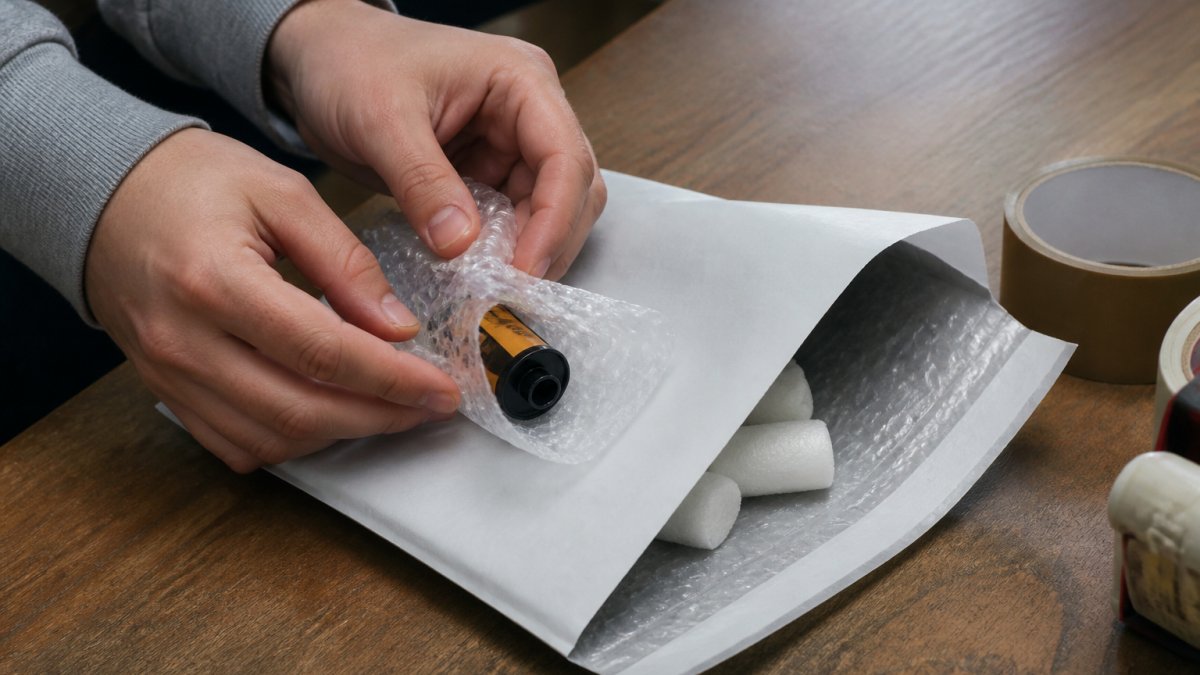
Packaging and shipping risks
Packaging is your first line of protection. Film needs cushioning against impact. A thin envelope is not enough: use bubble wrap, cardboard and sturdy outer packaging.
Rough handling is not the only risk. Heat and light can damage film. Keep undeveloped film in its light-tight cartridge or backing paper and use protective packaging.
Tracking and insurance options
Always send film with tracking. Without it, you cannot check where your parcel is. Ask labs, including Analog Film Lab, about available shipping and insurance options.

If insurance options are not listed, ask the lab. A reliable lab should take shipping concerns seriously and explain the available options so you can choose what suits you.
Film developing turnaround: how long will you wait?
Patience is part of analogue photography. But how long should you actually expect to wait?
Standard turnaround and express processing
Regular processing is usually completed within 1–2 working days after receipt. Developing, drying, scanning and quality checks all take time; special processes may follow a different schedule.
Some labs offer express processing. It costs more and is not always necessary. Standard service suits many hobby photographers; express service may help professionals working to a deadline.
Comparing scan resolution and file quality
Many photographers find this confusing. What does 4000 dpi mean, and is it better than 2400 dpi? Search results rarely explain resolution alongside file format and intended use. Here is what the figures mean for sharing, archiving and printing.
What resolution actually determines
Scan resolution determines the number of pixels captured across your negative. More dpi means more pixels across the same film width and potentially more detail and cropping flexibility. The detail actually resolved also depends on the film and scanner.
A useful rule is to choose resolution for your intended result, rather than simply choosing the highest number.
File formats and what they mean for your workflow
Alongside resolution, file format affects how useful a scan will be:
- JPEG, compact and ready to share, but repeated saving with lossy compression can reduce quality. Suitable for online sharing and quick selections.
- TIFF, large and capable of lossless storage, commonly used for archiving and further editing. Useful when you plan to print or make adjustments later.
- Unprocessed scan (raw-like), offers substantial adjustment flexibility but requires you to process and export the image yourself.
Ask the lab which file format you will receive. Heavy JPEG compression can reduce the benefit of a high-resolution scan compared with a slightly lower-resolution TIFF.
What you need for each purpose
Purpose |
Typical resolution |
File format |
Indicative file size |
|---|---|---|---|
Online sharing |
Up to approximately 2000 dpi |
JPEG |
A few MB |
Prints up to around 20 × 30 cm |
Approximately 2400–3200 dpi |
JPEG or TIFF |
A few tens of MB |
Large prints and archiving |
Approximately 4000 dpi and above |
TIFF |
Tens to over a hundred MB |
These file sizes are indicative for 35mm. At the same scanning dpi, medium format produces larger files because a larger film area is scanned.
Colour rendering and consistency between rolls
File quality is about more than pixels. Colour rendering and consistency between rolls are equally important, especially for a series of photographs. Different colour treatments can produce scans that do not match. Ask about the lab's colour workflow and whether it can accommodate your preferences.
How to compare scan resolutions fairly between labs
Compare the entire workflow: resolution, file format, colour profile, included adjustments and negative returns. Two labs advertising '4000 dpi' can deliver very different files if one supplies an adjusted TIFF and the other a compressed JPEG.
Home developing or a lab: which suits you?
This is an important choice, and both approaches have advantages.
Advantages of professional processing
A professional lab takes care of the technical work. You take photographs; the lab processes them.
Professional labs also offer equipment that is difficult to match at home. Noritsu scanners can deliver consistent, high-quality scans.
A lab also manages the processing workflow, including chemistry, equipment settings and careful handling, so you do not need to manage those steps yourself.
When developing at home makes sense
Developing at home gives you direct control over development time, temperature and push or pull processing.
It is also a craft that many photographers enjoy learning.
Home developing requires an investment in a suitable dark loading space or changing bag, chemistry, equipment and time. A reliable lab is more practical for many hobby photographers.
How to choose the right lab for your film
The choice depends on your needs.
Specialisation and film types
Labs specialise in different areas. Some only process standard C-41 colour film.
Check what a lab supports. If you shoot a lot of black-and-white film, choose a lab experienced in that process.
Analog Film Lab draws on Foto Americaine's photographic heritage since 1906. We understand how handling 120 medium-format film differs from 35mm, and how black-and-white film needs different attention from colour film.
Quality guarantees and colour rendering
Ask about the lab's quality policy. What happens if you are not satisfied? Can the scans be adjusted?
Colour rendering is crucial. Standard profiles do not suit every photograph or preference.
At Analog Film Lab, we use professional Noritsu scanners. Discuss your preferred colour rendering or corrections when ordering.
Frequently asked questions
What is the difference between a specialist film lab and a generalist developing service?
A specialist lab uses professional equipment such as Noritsu scanners and has experience with the film formats and processes it supports, including 35mm, medium format, black-and-white, C-41 and slide film. Generalist services may offer fewer film types or scan options. Specialist experience can help with colour rendering, scan quality and correct handling of each film type.
How long does film developing and scanning take?
At Analog Film Lab, regular C-41 and black-and-white developing and scanning usually take approximately 1–2 working days after receipt. This includes processing, quality checks and scanning. Special processes and requests may have a different turnaround. Allow additional time for postage in both directions.
How do I send film safely to a developing lab?
Cushion your film with bubble wrap or foam. Put it in a sturdy envelope or box and use a reliable tracked service. Avoid extreme heat and keep undeveloped film protected from light. Many labs deliver scans digitally and offer negative returns by post. Check the available shipping options and insurance terms.
What does developing and scanning a roll usually cost?
The cost varies with film type and scan resolution. Standard scans cost less than higher-resolution options. Black-and-white processing may be priced differently from C-41 colour film. The final price depends on the lab and selected options. Check whether postage is included.
Can I develop my photographs myself instead of using a lab?
Yes, with a light-tight loading space or changing bag and the correct chemistry and equipment. Home developing lets you control processing. High-quality scanning also requires suitable equipment and technique. Many photographers use a hybrid approach: developing negatives themselves and having a professional lab scan them.
Choosing the right lab means choosing a partner that understands your photography. At Analog Film Lab, we are photographers helping photographers. Drawing on Foto Americaine's heritage since 1906, professional Noritsu scanning and support for a range of film types, we give your film the attention it deserves. CHOOSE YOUR FILM & OPTIONS →